
If your accounting software has ever felt like it was doing things behind the scenes that you didn’t fully understand, you’re not alone. For many business owners, learning a few accounting basics can make it easier to understand what’s happening behind the scenes when you send invoices, record payments, pay bills, transfer money, and manage day-to-day transactions.
The good news is that you do not need to become an accountant to understand the basics. Once you understand the five main account types, how debits and credits work, and how journal entries record business transactions, the information in your accounting software becomes much easier to follow.
In this guide, we’ll break down the accounting basics every business owner should know, explain debits and credits in simple terms, show what journal entries your accounting software is creating behind the scenes, and walk through common business transaction examples.
Table of Contents
- What Accounting Basics Should Every Business Owner Know?
- What Are the Five Types of Accounts in Accounting?
- What Is a Chart of Accounts and Why Is It Important?
- What Are the Two Main Financial Statements in Accounting?
- What Is the Basic Accounting Equation?
- How Does Accounting Work for a Small Business?
- Do Business Owners Need to Understand Accounting If They Use Accounting Software?
- Why Should Business Owners Understand Debits and Credits?
- How Do Business Owners Know When to Debit or Credit an Account?
- What Is the Difference Between a Debit and a Credit in Small Business Accounting?
- What Is the Easiest Way for a Business Owner to Remember Debits and Credits?
- Does Accounting Software Automatically Create Journal Entries?
- How Do Cash and Accrual Accounting Affect Journal Entries in Accounting Software?
- What Journal Entries Is Accounting Software Making for a Business Owner?
- Do Business Owners Need to Make Journal Entries Manually?
- What Are Some Common Journal Entry Examples for Business Owners?
- How Do You Record Sales With Payment Processing Fees?
- Understanding What’s Happening Behind the Scenes
- FAQs
- About the Author
What Accounting Basics Should Every Business Owner Know?
Before getting into the journal entries happening inside QuickBooks or Xero, it helps to understand the foundation those entries are built on.
At its core, accounting represents the transactions of a business that impact its value. Those transactions are recorded through journal entries, organized into accounts, and eventually summarized into financial reports.
A simple way to picture the process is:
Business Transaction → Journal Entry → Accounts → Financial Statements
What Are the Basic Accounting Fundamentals?
You don’t need to know every accounting rule to understand your books. For most business owners, the important basic accounting fundamentals start with understanding how these pieces work together:
| Accounting Fundamental | What It Does |
|---|---|
| Five Account Types | Categorize the different types of activity in the business |
| Chart of Accounts | Organizes the individual accounts used to track that activity |
| Journal Entries | Record transactions through debits and credits |
| Income Statement | Shows business profitability over a period of time |
| Balance Sheet | Shows the financial position and value of the business |
| Accounting Equation | Connects assets, liabilities, and owner's equity |
| Debits and Credits | Record increases and decreases within accounts |
We’ll connect these concepts throughout this guide rather than treating them as separate accounting rules.
Why Is Understanding Accounting Important for Business Owners?
Accounting software can automate much of the recording process, but understanding the accounting basics gives you context for the numbers it produces.
Basic accounting knowledge can help you understand:
what your business owns and owes
how much your business earns and spends
where different transactions are being recorded
what your financial reports are communicating
how everyday business activities affect your books
what your accounting software is doing behind the scenes
Instead of only knowing which buttons to click, you can start understanding why a transaction affects your accounting records the way it does.
How Does Accounting Help You Understand What Is Happening in Your Business?
Individual transactions alone don’t always tell you much about the bigger picture. Your business may have invoices, customer payments, bills, credit card purchases, bank transfers, and many other transactions happening throughout the year.
Accounting organizes that activity so you can answer more meaningful questions, such as:
Is the business profitable?
What does the business own?
What does the business owe?
How much value is held in the business?
Where is the business earning and spending money?
To organize all of this activity, accounting starts by placing accounts into five main categories.
What Are the Five Types of Accounts in Accounting?
Every account in your accounting records falls into one of five main account types:
| Account Type | What It Represents | Common Examples |
|---|---|---|
| Assets | Everything the business owns | Cash, bank accounts, equipment, inventory |
| Liabilities | Everything the business owes | Credit cards, loans, unpaid bills |
| Owner' Equity | The owner's value in the business | Owner investments and equity |
| Revenue / Income | Money the business earns | Sales, service income |
| Expenses | Costs associated with the operating the business | Contract labor, fees, operating expenses |
These categories become especially important when we get to debits and credits because the account type determines whether a debit or credit increases or decreases the account.
 What Are Assets?
Starting with what the business owns, assets include resources such as:
- cash
- business bank account
- equipment
- buildings
- inventory
Assets appear on the Balance Sheet and have a normal debit balance, which will become important when we start working with debits and credits.
What Are Expense Accounts?
Of course, operating a business also comes with costs. Expense accounts track those costs.
Revenue and expenses work together on the Income Statement to determine whether the business generated a net income or loss during a particular period.
 What Are Revenue or Income Accounts?
Now we move from what the business owns and owes to what the business earns.
Revenue or income accounts track money earned through business activity, such as selling products or providing services.
Revenue appears on the Income Statement and has a normal credit balance.
What Are Liabilities?
On the other side, a business can also have amounts that it owes. These are called liabilities.
Examples include business loans, credit card balances, and unpaid bills. Liabilities also appear on the Balance Sheet, but their normal balance is a credit.
What Is Owner’s Equity?
Alongside what the business owns and owes is owner’s equity, which essentially represents the owner’s value in the business.
This is where investments made by the owner are tracked. The net income generated from revenue and expense accounts also ultimately flows into owner’s equity.
We now know the five broad account categories but an actual business needs many individual accounts underneath them. That’s where the chart of accounts comes in.
What Is a Chart of Accounts and Why Is It Important?
What Is a Chart of Accounts?
A chart of accounts (COA) is the organized list of individual accounts used to track activity in your business.
Think of the five account types as the main categories and your chart of accounts as the detailed list underneath them.
| Account Type | Individual Accounts Might Include |
|---|---|
| Assets | Business Checking, Business Savings, Equipment |
| Liabilities | Business Credit Card, Business Loan, Accounts Receivable |
| Revenue | Sales, Service Income |
| Expenses | Contract Labor, Payment Processor Fees |
Every individual account still belongs to one of the five main account types.
How Are Business Transactions Organized Into Accounts?
When something happens in the business, accounting identifies which accounts are affected.
For example:
| Business Activity | Accounts That May Be Affected |
|---|---|
| Customer pays the business | Cash / Bank + Revenue or Accounts Receivable |
| Business pays a contractor | Cash / Bank + Contractor Labor Expense |
| Money moves to savings | Business Checking + Business Savings |
| Business pays it credit card | Cash / Bank + Credit Card Liability |
Exactly how these accounts are increased or decreased is recorded through a journal entry, which we’ll break down later in this guide.
Why Should Business Owners Customize Their Chart of Accounts for Their Business?
There can be a lot of subjectivity in how individual accounts are named and organized. That’s why I recommend customizing your chart of accounts to reflect the language you actually use in your business.
A chart of accounts should help you understand your financial activity rather than make it more confusing. Using account names that clearly describe what you’re tracking makes your accounting records and reports easier to interpret.
Once all of those transactions have been organized into accounts, the next question is: how does that information become something useful?
That’s where financial statements come in.
What Are the Two Main Financial Statements in Accounting?
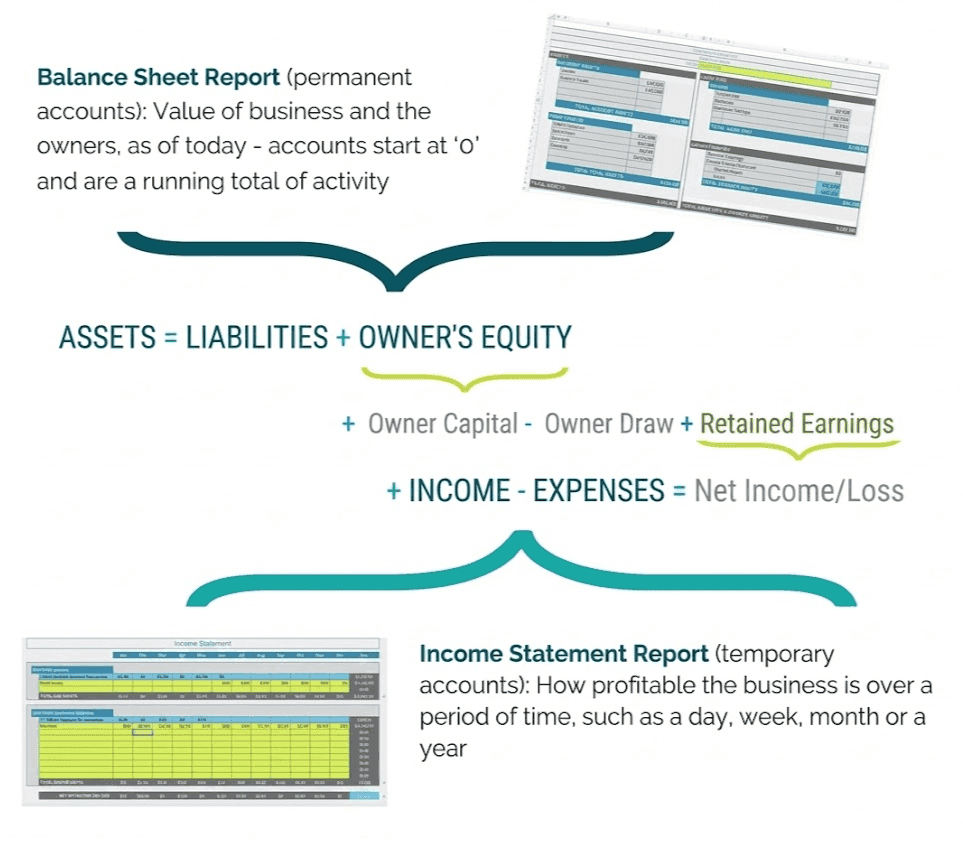
Accounting records are summarized into financial reports that help business owners understand what is happening financially in the business. These reports turn everyday transactions into useful information that can be used to evaluate the business’s performance and financial position.
Two of the most important reports are the Income Statement and Balance Sheet.
Here’s a quick comparison of what each financial statement shows:
| Income Statement | Balance Sheet | |
|---|---|---|
| What It Shows | Business profitability | Financial position and value of the business |
| Time Frame | Over a period of time | As of a specific point in time |
| Account Types | Revenue + Expenses | Assets + Liabilities + Owner's Equity |
| Basic Relationship | Income - Expenses = Net Income / Loss | Assets = Liabilities + Owner's Equity |
What Is an Income Statement?
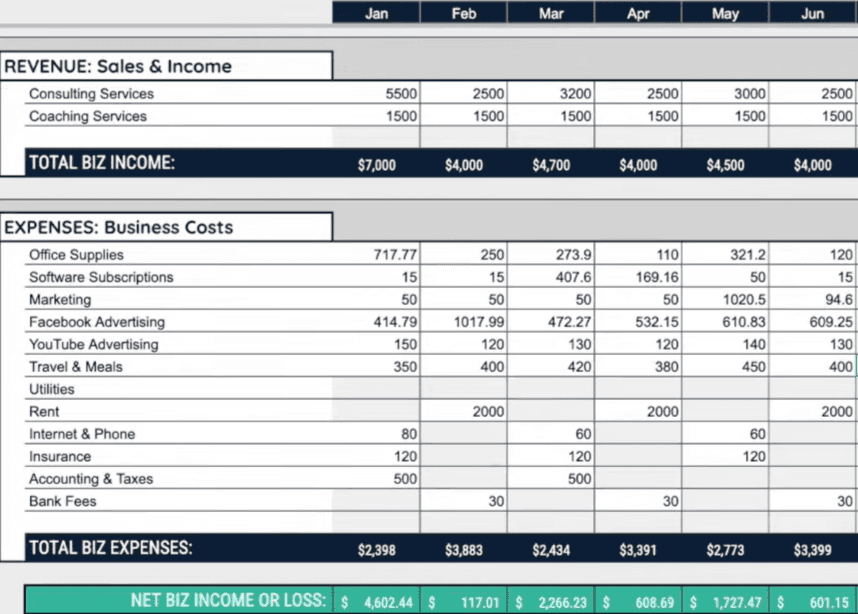
The Income Statement shows how profitable the business is over a period of time, such as a day, month, quarter, or year.
At its simplest:
Income − Expenses = Net Income or Loss
Revenue and expense accounts are considered temporary accounts because they track activity over a particular accounting period.
Want to learn more about the Income Statement?
Watch my full video where I break down the Income Statement and show you how to understand what it’s telling you about your business.
Watch the breakdown of the Income Statement Here!
What Is a Balance Sheet?
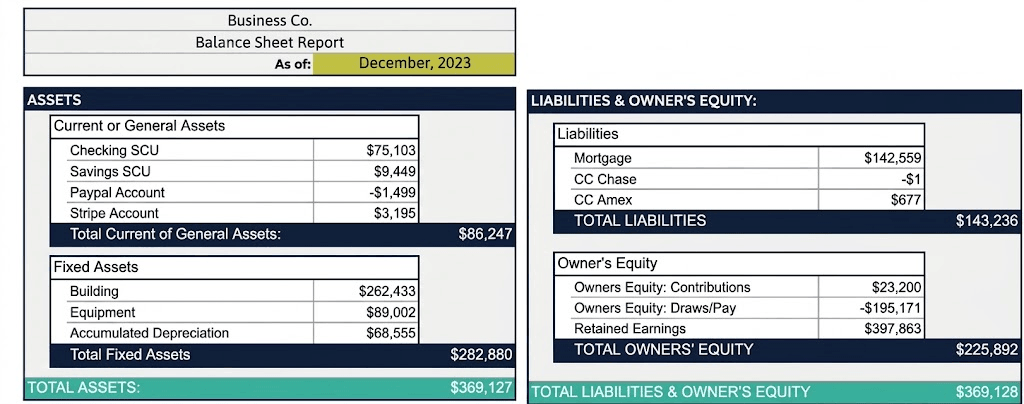
It contains three account types:
- Assets
- Liabilities
- Owner's Equity
These are permanent accounts. Instead of starting over for each reporting period, their balances continue as business activity occurs.
Want to learn more about the Balance Sheet?
Watch my full video where I break down the Balance Sheet and show you how to understand what it’s telling you about your business.
WATCH: Balance Sheet Explained in Simple Terms
What Does Each Financial Statement Tell You About Your Business?
A simple way to think about the difference is:
Income Statement: How profitable was my business during this period?
Balance Sheet: What does my business own, owe, and have in owner value at this point in time?
Which Account Types Appear on the Income Statement and Balance Sheet?
All five account types have a place within these two report:
Income Statement
| Balance Sheet
|
The two reports are also connected. Net income from the Income Statement ultimately flows into owner’s equity on the Balance Sheet.
And that brings us directly to the equation behind the Balance Sheet.
What Is the Basic Accounting Equation?
The basic accounting equation is:
Assets = Liabilities + Owner’s Equity
What Does Assets = Liabilities + Owner’s Equity Mean?
The equation connects what the business owns with what it owes and the value belonging to its owner
| Assets | = | Liabilities + Owner’s Equity |
| What the business owns | What the business owes + owner’s value in the business | |
This relationship forms the foundation of the Balance Sheet.
How Is the Accounting Equation Connected to the Balance Sheet?
The accounting equation is not just a separate formula to memorize. It is the underlying structure of the Balance Sheet.
Assets, liabilities, and owner’s equity are the permanent accounts reported on the Balance Sheet, allowing the report to show what the business owns, what it owes, and the owner’s value in the business.
The Income Statement connects back to the equation as well because net income or loss ultimately flows into owner’s equity. As transactions continue to change these account balances, the accounting equation still needs to stay balanced.
Why Does the Accounting Equation Remain Balanced?
This is where double-entry accounting comes into the picture.
Business transactions affect at least two accounts and are recorded using debits and credits. For every journal entry, the total amount recorded as debits must equal the total amount recorded as credits:
Total Debits = Total Credits
This keeps the accounting records balanced even as money moves in, out, and between different accounts.
Understanding that rule gives us the foundation, but it becomes much easier to see how it works when we connect it to the transactions happening in an actual business.
How Does Accounting Work for a Small Business?
The easiest way to understand accounting for a small business is to start with activities you’re probably already doing.
A business might:
- send an invoice
- receive payment from a customer
- receive a bill
- pay a bill
- transfer money between bank accounts
- make a payment on a business credit card
Each activity affects different accounts in your accounting records. The accounting process identifies those accounts, records the changes, and eventually summarizes the results in your financial statements.
How Are Business Transactions Recorded in Accounting?
When a transaction happens, accounting identifies what the business gave or received, which accounts were affected, and whether those accounts increased or decreased.
For example, if your business receives cash, your bank account increases. But because accounting uses a double-entry system, there is another side to the transaction that also needs to be recorded.
Those changes are captured through a journal entry.
What Are Journal Entries?

Journal entries record a business transaction by debiting and crediting the accounts affected by it.
Rather than thinking of a journal entry as a separate accounting concept, think of it as the step that connects an everyday business transaction to the accounts in your books.
For example:
Business transaction → Identify affected accounts →
Debit and credit those accounts → Update account balances
Your accounting software may create these journal entries automatically, which means you can be using double-entry accounting every day without manually creating the entries yourself.
How Do Accounts and Financial Statements Work Together?
Now that we know how transactions become journal entries, we can connect that activity back to the bigger accounting picture:
Business Transaction
↓
Journal Entry
↓
Individual Accounts / Chart of Accounts
↓
Account Balances
↓
Income Statement + Balance Sheet
In other words, your financial statements summarize the business activity that has already been recorded and organized through your accounting system.
That entire process is still happening when you use accounting software. The difference is that software can handle many of these steps automatically in the background, which brings us to an important question for business owners.
Do Business Owners Need to Understand Accounting If They Use Accounting Software?
Accounting software makes bookkeeping easier, but it doesn’t eliminate the accounting happening underneath. In fact, many of the journal entries we’ve been discussing are created automatically when you perform everyday tasks in QuickBooks or Xero.
What Does Accounting Software Do Behind the Scenes?
When you perform common accounting tasks, the software records how those activities affect your accounts. Behind each action, your accounting software is using accounts, journal entries, debits, and credits to record what happened.
Why Is Basic Accounting Knowledge Still Useful When Using Accounting Software?
You don’t need to become an accountant or manually create every journal entry. However, understanding the accounting basics gives you context for what your software is recording.
It can help you better understand:
- why a transaction affects certain accounts
how transactions eventually appear in your financial statements
why something may be categorized incorrectly
what your software is actually doing instead of treating it like a “black box”
That becomes especially useful when you’re reviewing your books or trying to understand why a number appears where it does.
How Can Understanding the Basics Help Business Owners Recognize What Their Software Is Doing?
Once you understand the five account types, chart of accounts, financial statements, accounting equations, and journal entries, the activity happening inside your accounting software becomes much easier to follow.
And now that we’ve built that foundation, we can look at the part that often causes the most confusion: debits and credits.
Why Should Business Owners Understand Debits and Credits?
Even if your accounting software handles the journal entries for you, understanding debits and credits can help you make sense of what it is recording behind the scenes.
It can help you:
- understand how transactions affect your business accounts
follow the logic behind journal entries
recognize why an account balance increased or decreased
better understand how those changes eventually appear in your financial reports
This becomes especially useful when something in your books doesn’t look right. Instead of only seeing the final number, you have a better idea of how the transaction got there.
And once you understand why debits and credits matter, the next step is knowing when to debit or credit an account.
How Do Business Owners Know When to Debit or Credit an Account?
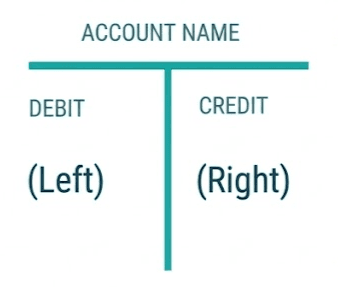
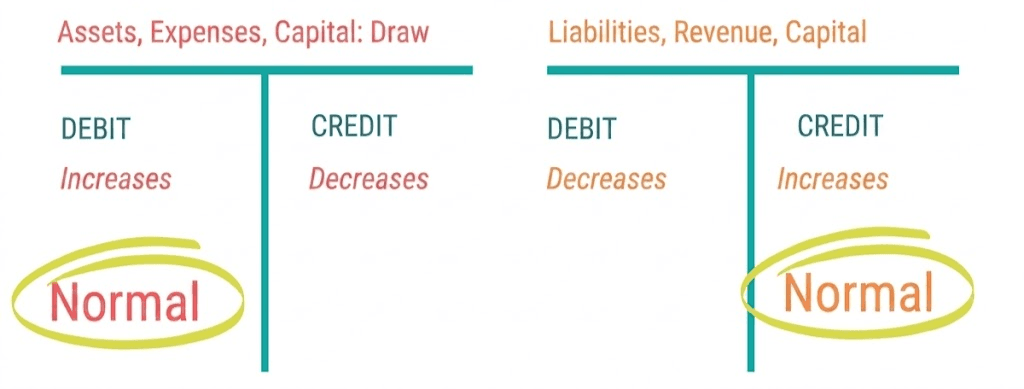
As we covered earlier, every account belongs to an account type. Each type has a normal balance, which tells you how that account normally increases.
| Account Type | Normal Balance | To Increase | To Decrease |
|---|---|---|---|
| Assets | Debit | Debit | Credit |
| Expenses | Debit | Debit | Credit |
| Owner Draws / Dividends | Debit | Debit | Credit |
| Liabilities | Credit | Credit | Debit |
| Revenue / Income | Credit | Credit | Debit |
| Owner's Equity / Capital | Credit | Credit | Debit |
Rather than memorizing individual journal entries, start by identifying the account type and whether that account needs to increase or decrease. From there, you can determine whether the change requires a debit or credit.
What Accounts Increase With a Debit?
Assets, expenses, and owner draws or dividends normally increase with a debit. A credit decreases these accounts.
For example, when cash enters your business bank account, the cash asset increases. Because assets have a normal debit balance, increasing cash requires a debit.
What Accounts Increase With a Credit?
Liabilities, revenue or income, and owner’s equity normally increase with a credit. A debit decreases these accounts.
For example, when your business earns revenue, the revenue account increases. Because revenue has a normal credit balance, that increase is recorded as a credit.
How Do You Determine Whether an Account Needs to Increase or Decrease?
Before deciding whether to debit or credit an account, start with the transaction itself: what actually changed?
Did the business receive cash? Earn income? Take on a liability? Incur an expense? Did money leave one account and move into another?
Once you identify what changed, the process becomes:
What happened? → Which account changed? →
What type of account is it? → Did it increase or decrease? → Debit or credit?
That same thought process can be used each time you work through a journal entry, which brings us to a simple way to remember the debit and credit rules.
What Is the Difference Between a Debit and a Credit in Small Business Accounting?
The difference between a debit and a credit is not simply that one increases an account while the other decreases it. Their effect changes depending on the type of account involved.
Does a Debit Always Mean an Increase?
No. A debit increases assets, expenses, and owner draws, but it decreases liabilities, revenue, and owner’s equity.
Does a Credit Always Mean a Decrease?
No. A credit does the opposite. It decreases assets, expenses, and owner draws, while increasing liabilities, revenue, and owner’s equity.
That’s why it’s more useful to think about the account type and its normal balance rather than treating debit as an increase and credit as a decrease.
Why Does the Effect Depend on the Account Type?
Each account type has a normal side where increases are recorded. Assets and expenses normally increase on the debit side, while liabilities, revenue, and owner’s equity normally increase on the credit side.
This is why it’s more helpful to think about which account is changing and how it is changing, rather than assuming that a debit always means an increase or a credit always means a decrease.
If you want to see these rules in action, I break down why debits and credits work differently across account types in this quick video.
Watch: Stop Confusing Debits and Credits!
Once that basic relationship makes sense, you don’t have to rely on memorization. You can use a simple process to work out which account should be debited or credited each time.
What Is the Easiest Way for a Business Owner to Remember Debits and Credits?
Instead of memorizing every possible transaction, start with what happened in the business and which accounts were affected.
My Accounting Cheat Sheet breaks the process down into five steps:
- What did we give or get?
What type of account is it?
What is the normal balance for that type of account?
Do you need to debit or credit the account to increase or decrease it?
Check the other side of the journal entry.
Following the same process each time makes it easier to work through a transaction without trying to memorize every possible debit and credit combination.
Why Is Identifying the Account Type Important?
The account type tells you how that account normally behaves. Once you know whether you’re working with an asset, liability, owner’s equity, revenue, or expense account, you can use its normal balance to determine whether an increase or decrease requires a debit or credit.
For example:
Cash → Asset → Debit to increase
Expense → Expense Account → Debit to increase
Sales → Revenue Account → Credit to increase
Now let’s put that process into an actual business transaction.
How Does This Work in an Actual Business Transaction?
Suppose Stripe processes $10,000 in client sales and charges a 2.9% processing fee. The business receives $9,710 after the $290 fee is deducted.
Start by identifying what changed:
Cash increases because $9,710 reaches the business bank account.
Stripe Payment Processor Fees increases because the business incurs a $290 expense.
Sales / Revenue increases because the business earns $10,000 in revenue.
From there, the account type and normal balance tell you whether each increase should be recorded as a debit or credit.
This same process can be applied to any transaction: identify what happened, determine which accounts were affected, and then use the debit and credit rules for those account types.
And you don’t have to rely on memory every time you work through those steps.
How Can a Debits and Credits Cheat Sheet Make the Process Easier?

A debits and credits cheat sheet gives you a quick reference for account types, normal balances, and how increases and decreases are recorded. It can make it easier to work through transactions without having to memorize every debit and credit rule along the way.
If you’d like to walk through these accounting basics with me, I break down the reports, account types, and debit and credit rules step by step in my Accounting 101 video.
Watch Accounting 101: Reports to Debits & Credits Here!
Keep the Debit and Credit Rules Within Reach
Take the guesswork out of debits and credits with a simple cheat sheet that helps you quickly work through account types, normal balances, and journal entries.
Download My Free Accounting Cheat Sheet Here!
With those debit and credit rules in mind, let’s look at how your accounting software applies them when you perform everyday business transactions.
Does Accounting Software Automatically Create Journal Entries?
Yes. When you perform everyday tasks in accounting software, the software is often creating automatic journal entries in the background.
You may only see the front-end action, such as sending an invoice, receiving a payment, or paying a bill, but the software still needs to record which accounts changed and whether those changes should be debited or credited.
What Happens Behind the Scenes When You Record a Transaction in Accounting Software?
When you record a transaction, the software generally:
- identifies the accounts affected
records the debit and credit sides of the transaction
updates the account balances
reflects those changes in your financial reports
That means the same journal-entry rules we’ve already covered are still being used, even if you never manually open a journal entry screen.
Before we walk through those transactions, there’s one important factor that changes when some journal entries are recorded: whether your business uses the cash or accrual method of accounting.
How Do Cash and Accrual Accounting Affect Journal Entries in Accounting Software?
The cash method and accrual method record income and expenses at different points in time, which means the journal entries behind the same business activity can also be different.
| Cash Method | Accrual Method | |
|---|---|---|
| Income is recorded | When the customer pays | When the income is earned |
| Expenses are recorded | When they are paid | When they are incurred |
| Accounts Receivable / Payable | Generally not used for recognition | Used to track amounts owed to or by the business |
For business owners, the key difference is timing. The cash method records transactions when money changes hands, while the accrual method records them when they are earned or incurred.
This difference becomes especially important with invoices and bills, where the transaction and the payment may happen at different times.
Does Sending an Invoice Create a Journal Entry Under Cash-Basis Accounting?
Under the cash method, simply sending an invoice does not record income yet because the customer has not paid.
Under the accrual method, income is recorded when it is earned, so sending the invoice creates a journal entry involving Sales/Revenue and Accounts Receivable.
When Is Revenue Recorded Under Accrual Accounting?
Revenue is recorded when it is earned, even if the customer has not paid yet.
That is why Accounts Receivable is used: it represents the amount the customer still owes the business.
When Are Expenses Recorded Under Cash Versus Accrual Accounting?
Under the cash method, an expense is generally recorded when the business pays it.
Under the accrual method, the expense is recorded when it is incurred, even if payment will happen later. In that case, Accounts Payable can be used to track the amount the business still owes.
This timing difference becomes much easier to understand when you see what the software is actually recording during everyday business transactions.
What Journal Entries Is Accounting Software Making for a Business Owner?
Everyday actions like creating an invoice, receiving a payment, entering a bill, or transferring money can trigger different journal entries in accounting software.
Let’s look at what’s happening behind the scenes with each one.
What Happens When You Create an Invoice?
When you create an invoice, you’re recording an amount that a customer owes your business.
Under the cash method, creating the invoice does not record the income yet because you haven’t received the payment.
Under the accrual method, the income is recorded when it is earned. For example, here’s a $1,000 invoice for services created in Xero:
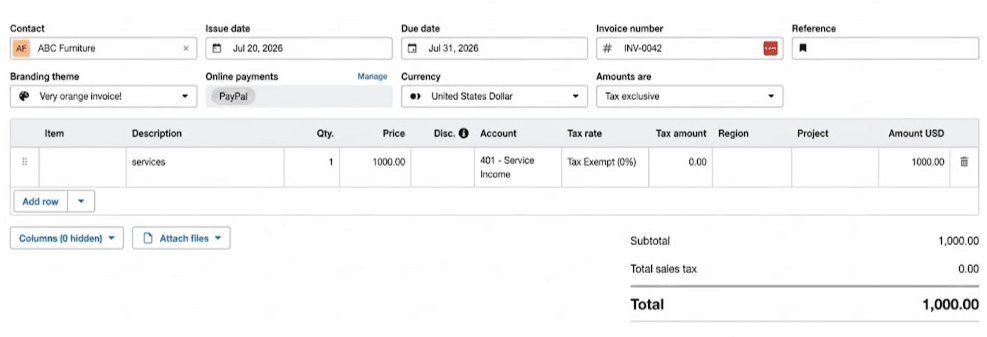
Example: A $1,000 customer invoice for services created in Xero.
Behind the scenes, the accrual-basis journal entry looks like this:
| Account | Debit | Credit |
| Accounts Receivable | $1,000 | |
| Sales / Revenue | $1,000 | |
| Total | $1,000 | $1,000 |
Accounts Receivable increases because the customer now owes the business $1,000, while Sales/Revenue increases to recognize the income earned.
Once the customer pays that invoice, the accounts affected change again.
What Happens When a Customer Pays an Invoice?
When the customer pays the invoice, the journal entry depends on the accounting method you’re using.
Under the cash method, this is when the income is recorded:
| Account | Debit | Credit |
| Cash / Bank Account | $1,000 | |
| Sales / Revenue | $1,000 | |
| Total | $1,000 | $1,000 |
Under the accrual method, the revenue was already recorded when the invoice was created. Instead of recording revenue again, the payment moves the amount out of Accounts Receivable and into the bank account:
| Account | Debit | Credit |
| Cash / Bank Account | $1,000 | |
| Accounts Receivable | $1,000 | |
| Total | $1,000 | $1,000 |
Here, the $1,000 payment from ABC Furniture is matched to the invoice created earlier:

This clears the amount the customer owed without recording the same revenue twice.
Next, let’s look at what happens when the business receives a bill.
What Happens When You Receive a Bill?
A bill means your business has received an expense that still needs to be paid.
Under the cash method, the expense is not recorded until you actually pay it.
Under the accrual method, receiving the bill records both the expense and the amount your business owes.
For example, here’s a $100 contractor bill in Xero that is still awaiting payment:
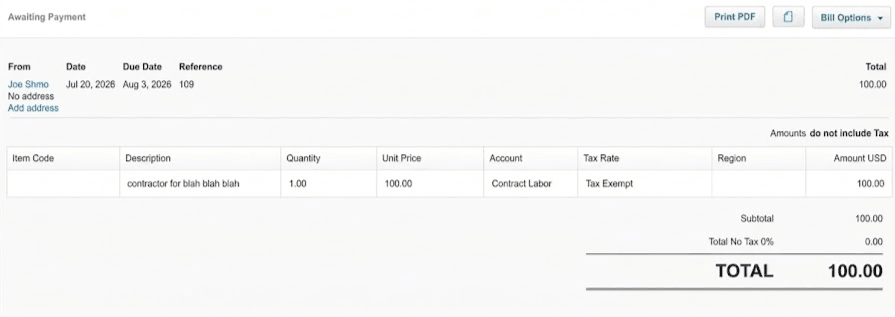
Behind the scenes, the accrual-basis journal entry looks like this:
| Account | Debit | Credit |
| Contract Labor Expense | $100 | |
| Accounts Payable | $100 | |
| Total | $100 | $100 |
The Contract Labor expense is recognized, while Accounts Payable tracks the $100 that still needs to be paid.
What Happens When You Pay a Bill?
Under the cash method, paying the bill is when the expense is recorded:
| Account | Debit | Credit |
| Contract Labor Expense | $100 | |
| Cash / Bank Account | $100 | |
| Total | $100 | $100 |
Under the accrual method, the expense was already recorded when the bill was received. Paying it now clears the amount in Accounts Payable.
| Account | Debit | Credit |
| Accounts Payable | $100 | |
| Cash / Bank Account | $100 | |
| Total | $100 | $100 |
Not every transaction involves income or an expense. Sometimes, money is simply moved from one business account to another.
What Happens When You Transfer Money Between Business Accounts?
A transfer between two business bank accounts doesn’t create income or an expense. It simply moves money from one asset account to another.
For example, if you transfer $2,000 from Business Checking to Business Savings:
| Account | Debit | Credit |
| Business Savings | $2,000 | |
| Business Checking | $2,000 | |
| Total | $2,000 | $2,000 |
The savings account increases, while the checking account decreases. Your total cash does not change; it is simply moved between two business accounts.
Paying a business credit card also moves money between accounts, but this time, you’re reducing a liability.
What Happens When You Pay a Business Credit Card?
A business credit card is a liability account because it represents money the business owes.
When you make a payment from your business checking account, the credit card balance decreases and money leaves the bank account.
For example, if you make an $800 payment toward your business credit card:
| Account | Debit | Credit |
| Business Credit Card | $800 | |
| Business Checking | $800 | |
| Total | $800 | $800 |
The credit card account is debited to decrease the liability, while Business Checking is credited because the cash in that asset account decreases.
This payment does not create a new expense. The expense would have been recorded when the original credit card purchase was entered. The payment itself simply reduces the amount your business owes on the card.
In all of these examples, the software handles the debits and credits behind the scenes. So does that mean you never need to create a journal entry yourself?
Do Business Owners Need to Make Journal Entries Manually?
For most everyday business transactions, no. Accounting software can create the necessary journal entries automatically when you use features like invoicing, receiving payments, entering bills, paying bills, and transferring money between accounts.
There are situations where a manual journal entry may be needed, but it shouldn’t be used to recreate transactions your accounting software is already recording for you.
The goal isn’t to memorize and manually enter every debit and credit. It’s to understand enough of what’s happening behind the scenes to know what your software is recording and why.
Once you can connect the action you take in the software with the accounts being affected, journal entries become much easier to follow.
You’ve already seen how journal entries work behind invoices, bills, transfers, and payments. Let’s apply those same rules to one more simple example before looking at a transaction that involves a few more moving parts.
What Are Some Common Journal Entry Examples for Business Owners?
A simple journal entry example is paying an everyday business expense directly from your business bank account.
Suppose you spend $200 on office supplies using your business checking account:
| Account | Debit | Credit |
| Office Supplies Expense | $200 | |
| Business Checking | $200 | |
| Total | $200 | $200 |
Office Supplies Expense increases with a debit, while Business Checking decreases with a credit.
The same basic process applies to other journal entry examples: identify what happened, determine which accounts were affected, and apply the debit and credit rules for those account types.
Some transactions, however, involve more than two amounts. Payment processing fees are a good example because the amount your customer pays may not be the same amount that reaches your bank account.
How Do You Record Sales With Payment Processing Fees?
A payment processor transaction involves three pieces to account for: the gross sale, the processing fee, and the cash actually deposited into your bank account.
Using the Stripe example from earlier, suppose your business earns $10,000 in client sales. Stripe charges a 2.9% processing fee of $290, leaving $9,710 deposited into the business bank account.
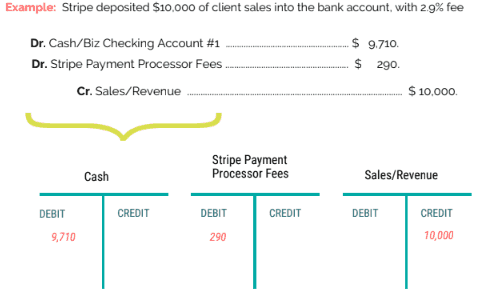
| Account | Debit | Credit |
| Cash / Bank Account | $9,710 | |
| Stripe Payment Processor Fees | $290 | |
| Sales / Revenue | $10,000 | |
| Total | $10,000 | $10,000 |
How Do You Record the Gross Sale?
Record the full $10,000 as Sales/Revenue, rather than recording only the amount deposited into the bank.
How Do You Record the Cash Actually Deposited?
The $9,710 net deposit is recorded as the increase in the business bank account.
How Do You Record the Payment Processor Fee?
The $290 fee withheld by Stripe is recorded separately as a payment processing expense.
Together, the $9,710 deposit and $290 processing fee account for the full $10,000 sale, keeping the journal entry balanced.
Understanding What’s Happening Behind the Scenes
You don’t need to memorize every journal entry or become an accountant to understand your books. The goal is to recognize what happened in the business, which accounts were affected, and how those changes are being recorded.
Once you understand the five account types, debits and credits, and the basic journal entries behind everyday transactions, your accounting software becomes much easier to follow. Instead of simply trusting what happens after you click a button, you have a better understanding of what the software is recording and why.
And when something doesn’t look right, you have a stronger foundation for knowing where to start looking.
 Ready to Get More Confident With Your Accounting?
Understanding what’s happening behind the scenes in your accounting software is a great start. But if you want help applying these concepts to your own business, you don’t have to figure it all out on your own. Having the right guidance can make it easier to understand your numbers and know what to focus on as your business grows.
Inside Master Your Accounting & Taxes, I’ll help you navigate the accounting and tax side of your business, understand what your numbers are telling you, and make more informed financial decisions with confidence.
Get More Help With Your Accounting & Taxes Here!
FAQs
What Is the Easiest Way to Understand Accounting?
Start with the five main account types: assets, liabilities, owner’s equity, revenue, and expenses. Once you understand what each account represents, it becomes easier to see how business transactions affect your accounts, financial statements, and overall books.
Do Business Owners Need to Understand Debits and Credits if They Use QuickBooks or Xero?
You don’t need to manually create every journal entry, but understanding debits and credits can help you make sense of what your accounting software is recording. It also gives you a better foundation for recognizing when a transaction may have been categorized or recorded incorrectly.
Do Debits and Credits Always Have to Balance?
Yes. In double-entry accounting, the total debits in a journal entry must equal the total credits. This keeps the accounting records balanced as transactions affect different accounts.
Can a Debit Increase One Account but Decrease Another?
Yes. A debit does not always mean an increase. Its effect depends on the account type. For example, a debit increases an asset or expense account but decreases a liability, owner’s equity, or revenue account.
Do QuickBooks and Xero Create Journal Entries Automatically?
Yes. Many everyday actions in accounting software, such as creating invoices, receiving customer payments, entering bills, and recording payments, can create the underlying accounting entries automatically. That’s why you may be using double-entry accounting without manually entering every journal entry yourself.
Can Accounting Software Make the Wrong Journal Entry?
Accounting software follows the information and transaction details entered into it. If something is categorized incorrectly, matched to the wrong account, duplicated, or entered incorrectly, the resulting accounting records may also be incorrect. Understanding the basics can make these issues easier to recognize.
Are Journal Entries Different Under Cash and Accrual Accounting?
They can be. Under the cash method, income and expenses are generally recognized when money is received or paid. Under the accrual method, income and expenses can be recognized when they are earned or incurred, which is why accounts such as Accounts Receivable and Accounts Payable become important.
How Can a Business Owner Check Whether a Journal Entry Is Correct?
Start by asking what happened in the transaction, which accounts were affected, and whether each account increased or decreased. Then check that the correct debit and credit rules were applied and that total debits equal total credits.
About the Author
Hi there, 
Background in public accounting, teaching courses in higher education and specializing in small business coaching, services and education. I'm Amanda!
Your Instructor | The Business Finance Coach
I've spent my career in accounting, tax, finance, and education—from working at PwC and KPMG to teaching accounting and taxes at colleges and universities, and creating educational content for companies including Intuit TurboTax.
Throughout that experience, I kept seeing the same problem: small business owners were hugely underserved.
They were overwhelmed by complicated accounting software, confused by conflicting advice, and often left feeling like this was a hopeless area of their business that they would never understand.
I knew there had to be a simpler way.
So I took what I'd learned from accounting firms, education, and working with real businesses, and created The Business Finance Coach and The Master Your Accounting & Taxes Program.
My goal is to make business finances simple, practical, and understandable—so you can confidently manage your business, keep more of what you earn, and focus on building the business you actually want.

![Best Accounting Software [Xero vs. Quickbooks vs. Wave vs. Freshbooks vs Spreadsheets]](https://dropinblog.net/img/pe2apnlc/700/youtube-thumbnail-best-accounting-software-v2-what-they-dont-tell-you)