![Best Accounting Software [Xero vs. Quickbooks vs. Wave vs. Freshbooks vs Spreadsheets]](https://dropinblog.net/img/pe2apnlc/700/youtube-thumbnail-best-accounting-software-v2-what-they-dont-tell-you)
Best Accounting Software - Xero vs. Quickbooks vs. Wave vs. Freshbooks vs Spreadsheets
This video is for business owners, bookkeepers, tax pros and financial coaches who want to learn how to choose the best accounting software for small businesses.
I'll be comparing features within Xero vs. Quickbooks vs. Spreadsheets vs. Freshbooks vs. Wave.
Plus, you'll learn the foundational basics that you need to know, if other options arrive in the future and for setting up the option you choose.
This resource can end the debate for you and give you all the information you need to know!
And... if you're impatient, I cover a summary of my recommendations first thing. However, I highly recommend going in order because the information builds to help you make the best decision.
Table of Contents
Check out the Youtube video if you prefer:
Summary of Recommendations:
If you are a Sole proprietor - then income and expense trackers are fine (because that's all they need to track, but if you can track more if you want).
- My free worksheet is a perfect FREE option (download it here)
- Spreadsheets, FreshBooks, and Wave are good options
- If you use Etsy, Wave has a direct integration
If you have an LLC, Corporation or Partnership - then you need a complete accounting system that tracks income, expenses, assets, liabilities and owners' equity.
- My unique spreadsheets from the Master Your Accounting & Taxes Program (learn more here)
- For software, Xero is the best (test it out at 90% off here)
- Generally, I do not recommend Quickbooks or Sage (most expensive and clunky)
- FreshBooks or Wave can be good cheaper options for simple situations (but it only takes a few transactions to create a headache!)
Read on to learn the details...
Two Types Of Accounting Software (Learn What You Need)
There are 2 broad categories of accounting software tracking.
- Income and expense trackers
- Complete accounting system (income, expense, asset, liabilities, and owners' equity)
And... accounting softwares do not explain this to you.
So, learning and understanding this now, will be so helpful for you down the road.
Which type of software you need, is based on your type of business.
- Sole proprietors - income and expense trackers (are fine because that's all they need to track)
- LLCs, Corporations & Partnerships - need complete accounting system
This is because the sole proprietor is not a separate business from the owners, whereas the LLC, corporation and partnership are separate business entities from the owners. (explained more next... read on!)
What Is A Separate Legal Business Entity?
A separate business entity means that it's separate from the people that own it.
In other words, think of a separate legal business entity as being it's own 'person'.
Like a person, it can:
- Own things
- Owe things
- Earn money
- Be held liable
The point of separate legal business entities was for "Limited Liability" or also called "Liability Protection".
This means that the business is responsible for itself, and the owners are not personally liable if the business does something wrong or can't pay it's debts.
This is meant to encourage people who have money to invest it in business, without fear of loosing their own personal assets.
The Sole Proprietor is the only business type that isn't separate from the owners.
Anyone can just start working as themselves and will default to being a sole proprietor.
However, once you form a separate business entity with a state, then you have a separate legal business entity.
Separate legal entities should complete accounting records and keep your personal finances separate from the business.
What Is An Accounting Record?
An accounting record is one place where you track everything - every single financial transaction - related to the business.
Often, business owners might have some information in a payment processor or invoicing tool, other information in a spreadsheet and other details from a credit card list.
Then come tax time they search until they get all the details. No!
Key features of an accounting record is that:
- It contains everything in one place.
- It's maintained regularly.
What Types Of Financial Transactions Do I Need To Track?
All businesses need to track:
- Income (sales)
- Expenses (costs to earn sales)
Separate legal business entities (like LLCs, Corporations, and also Partnerships), need to also track:
- Assets, like bank accounts and equipment (everything owned by the business)
- Liabilities, like credit cards and loans (everything owed by the business)
- Owners' Equity (the value of the owners activity in the business)
Only Sole Proprietor businesses can just track income and expenses.
What Type Of Business Do I have?
This is a really important thing to know when you are choosing your accounting software.
And... people are often more confused about this then they realize.
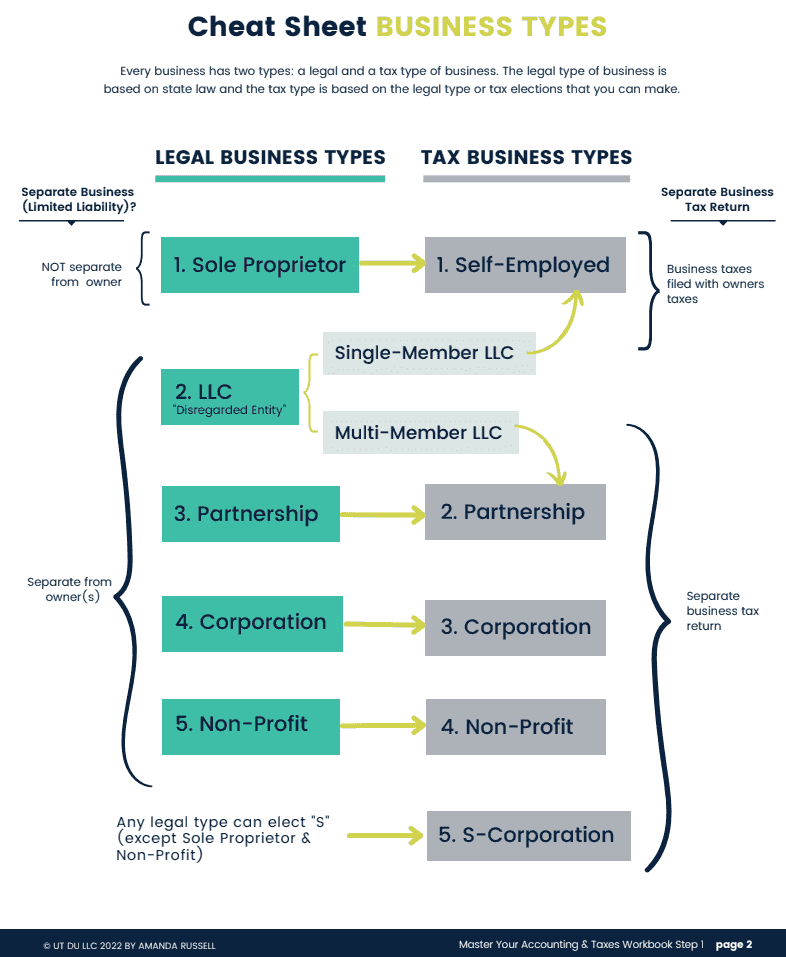
First thing to understand, every business has 2 types:
- A LEGAL TYPE - set up under a state law (LLC, corporation, partnership)
- A TAX TYPE - this is how the business is taxed and is based on the LEGAL type of business and then any tax elections that were made.
Note: the legal type of business comes first!
If you do not form a legal business under a state, then you default to Sole Proprietor.
Summarizing This Section:
Know your legal type of business and your tax type of business, so that you have clarity and know what type of accounting records to keep.
- Sole proprietors - income and expense trackers(are fine because that's all they need to track)
- Easier accounting to track
- Doesn't need to keep business activity separate from personal
- LLCs, Corporations & Partnerships - need a complete accounting system
- More difficult accounting to track (generally "double entry" accounting)
- Must keep personal finances separate from the business finances
- Business should own it's own bank accounts and credit card accounts (and track every transaction in one accounting record, regularly)
- Business should not pay for personal expenses and should reimburse owners for business expenses paid for personally
Background Of Accounting Software (You'll Find This Helpful, I Promise!)
I’m going to give you a little history about these accounting softwares that will help you understand my recommendations, as well as evaluate any other accounting software that you might run into.
Accounting has forever been done on paper using debits and credits.
I describe debits and credits as the language of accounting and business. And like all languages, if you aren’t using it regularly, it can be very difficult to maintain knowing it.
Accounting software was (and continues to be) custom built for large companies and their specific processes.
They are big names, that have been around a long time and they've had huge market share.
Overall, these softwares have been pretty clunky and quirky, which means:
- they aren't intuitive
- the bank imports are glitchy
- job costing gets messy and is difficult even though it shouldn’t
- overall I’ve found Quickbooks to be really time consuming
- and they are the most expensive! Sage being the most expensive
When companies have big market share and grow very large within, it can be difficult for them to change and improve. That's been my impression of Quickbooks.
Xero started about 10 years ago and it was their mission to be full accounting software and to be better than quickbooks.
I think they’ve succeeded. The software is far more intuitive and has better functionality than Quickbooks.
Currently, Quickbooks has about 6.5 million users and Xero has 4.5 million.
Considering Quickbooks has been around about over 40 years and Xero just 10 year; that speaks for itself.
Then, we have tons of smaller companies popping up more recently.
Although many claim to be full accounting software, my experience with them is that they tend to be better as income and expense trackers.
They have a lot of good peripheral features, like invoicing, time tracking and receipt capture.

Wave and Freshbooks are the most notable, with Freshbooks being better than wave for full accounting software.
But overall, in my limited experience with them I found them to be limited as full accounting software.
While they can be great for very small simple businesses - the problem with saying that is that it only takes a few transactions in those assets, liabilities and owners equity areas to create some really big headaches in the software.
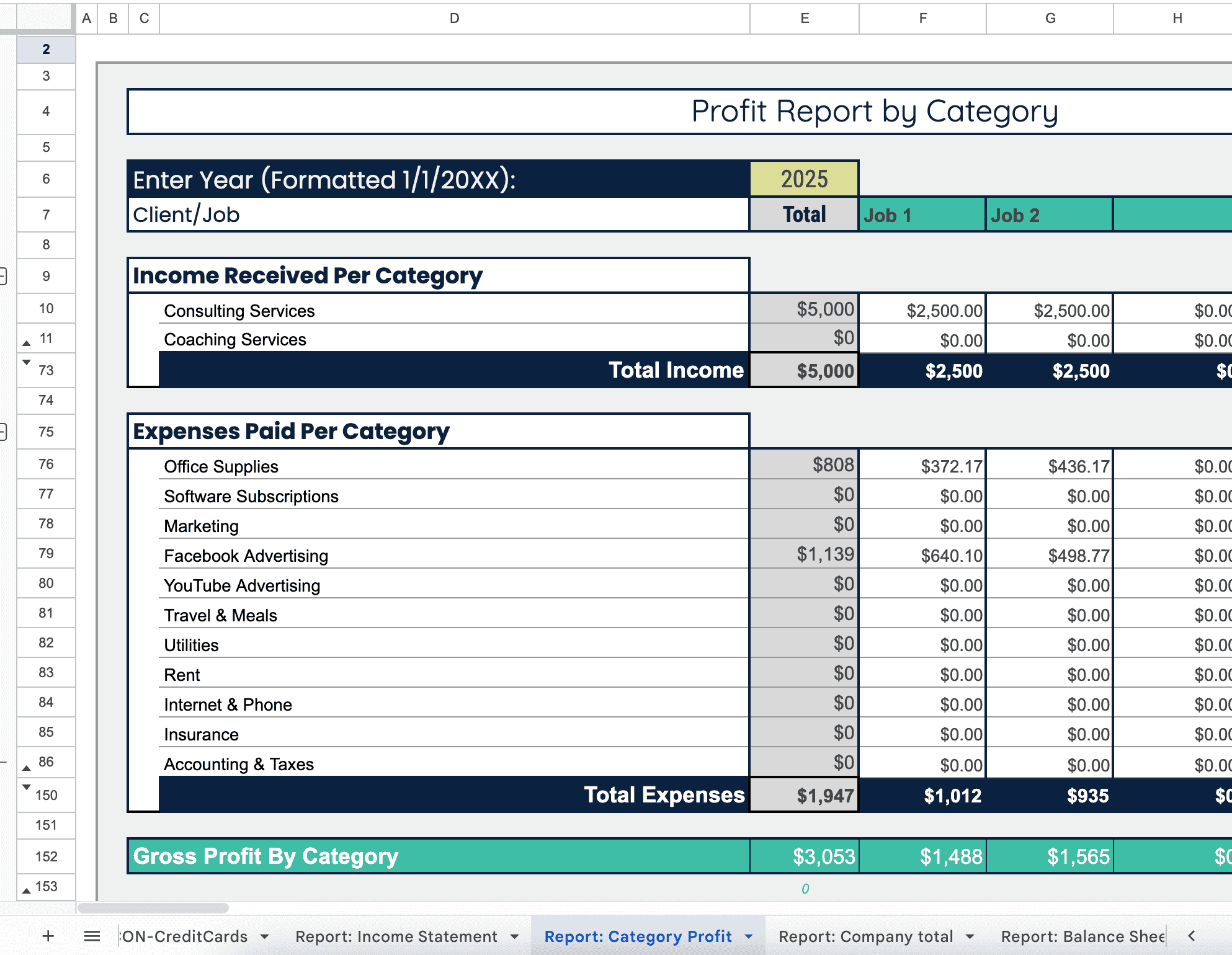
And lastly, we have my favorite - spreadsheets.
Spreadsheets are also notoriously better as income and expense trackers (and I give one away for free here).
Until my Master Your Accounting & Taxes program, which created complete accounting spreadsheet templates.
These spreadsheets are complete accounting records tracking income, expenses, assets, liabilities and owners' equity.
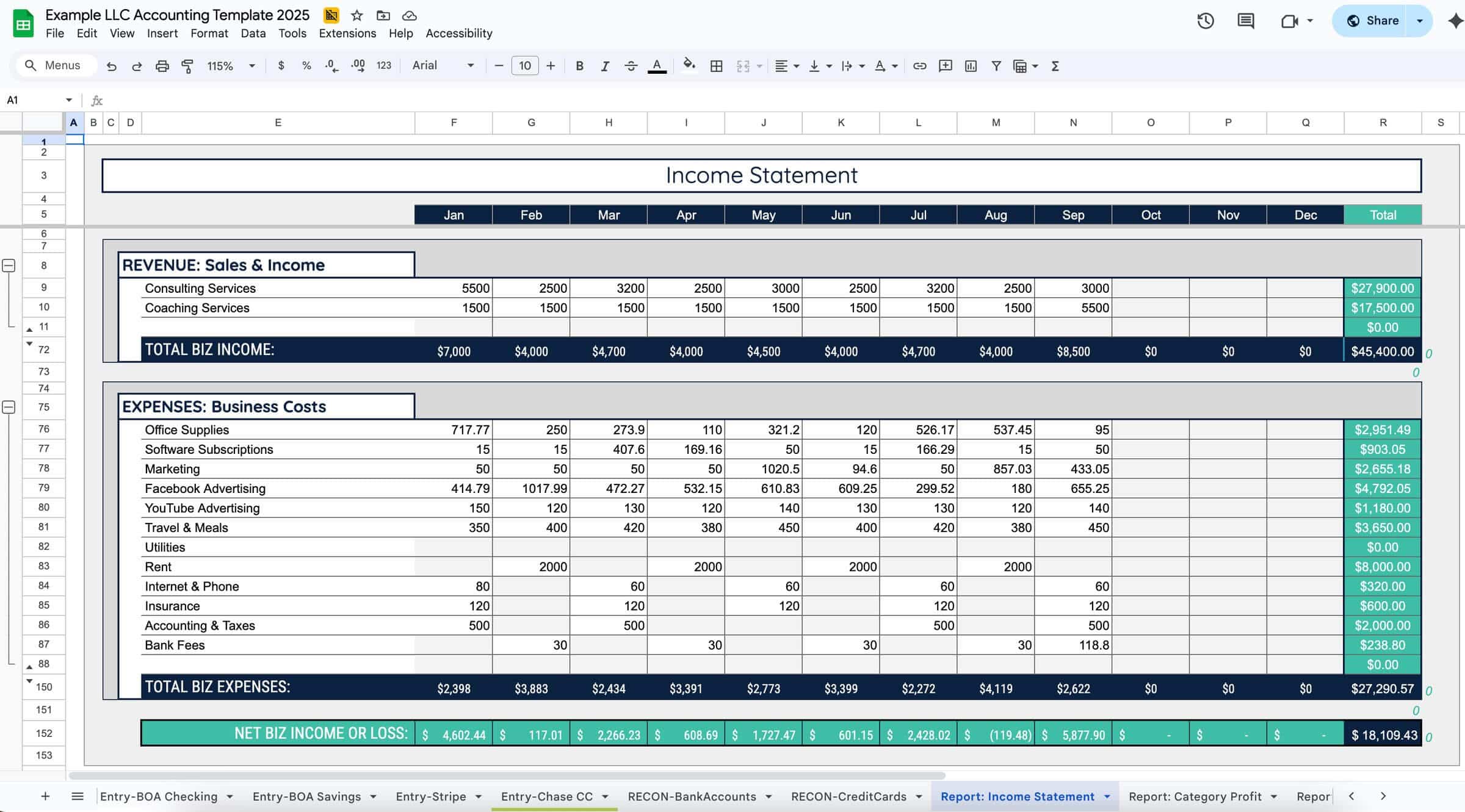
They are really unique!
And... they do not use debits and credits, so they remove the need to speak the accounting language to use them.
They are really powerful because they allow people to actually understand their business finances.
Plus, once you purchase the templates, GoogleSheets is free and you can use them forever!
(And for your personal finances too!)
Feature Comparison...
Next we'll go through the features and compare Xero vs. Quickbooks vs. Sage vs. Freshbooks vs. Wave vs. my Spreadsheets.
I'll make my final recommendations at the end.
Pricing
All of the softwares offer discounts for the first month (or few months) and discounts if you pay in full for a year.
I'm going to ignore the discounts and compare the monthly pricing for all of these softwares.
All softwares have additional fees for payroll, with Quickbooks having their own payroll features and all the other softwares integrating with Gusto. Gusto is slightly cheaper than Quickbooks Payroll.
Sage
Sage doesn't post pricing on their website, and that's usually a sign that the price is high and that's definitely the case here.
Although they do have some lower cost plans through bookkeepers, this software is generally the most expensive.
Plus, since it's in the QuickBooks category of old, clunky and quirky - I will leave it out of the remainder of the features.
Quickbooks
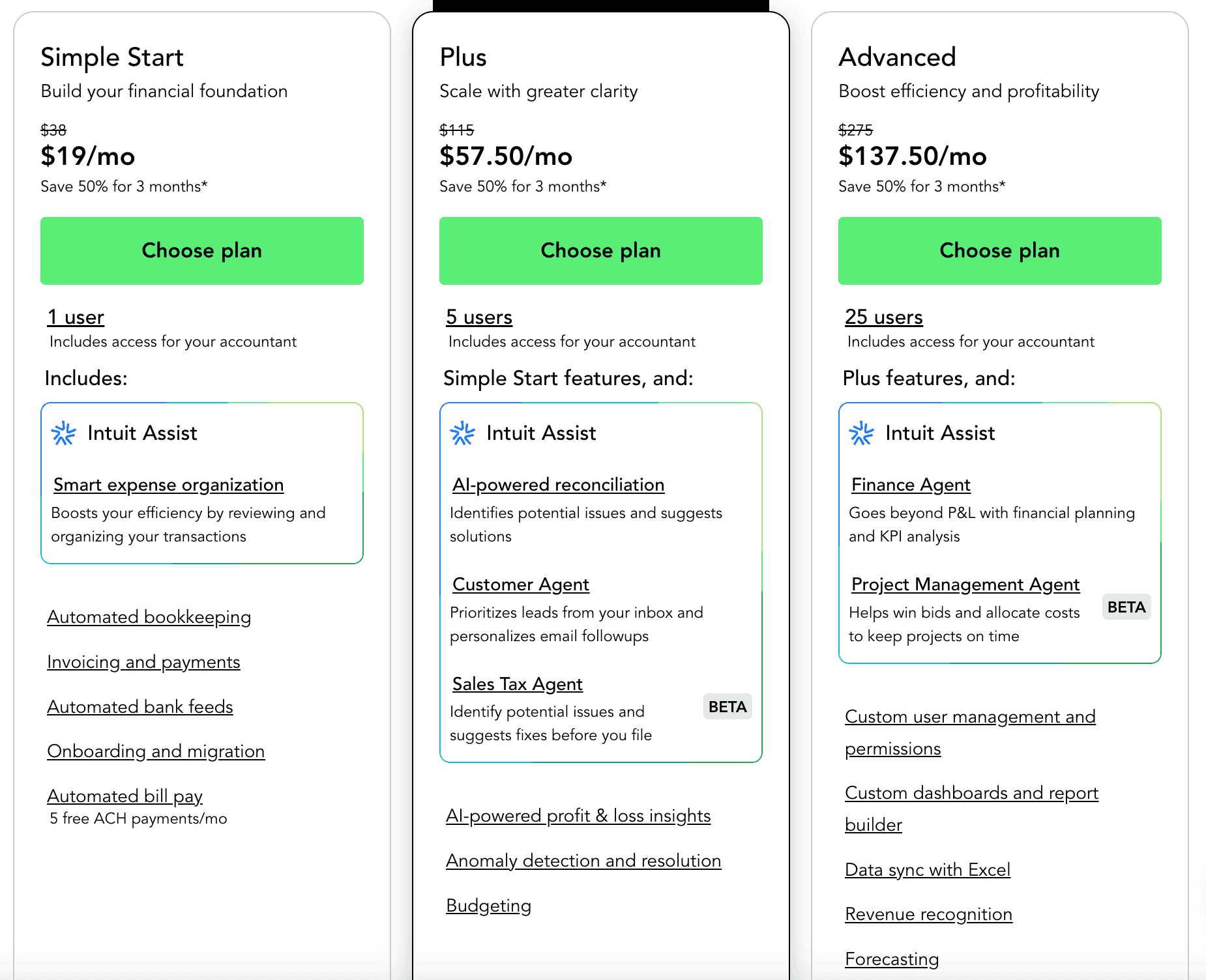
Quickbooks plans start at $38, $115 and $275. With add ons for payroll and additional users.
Xero
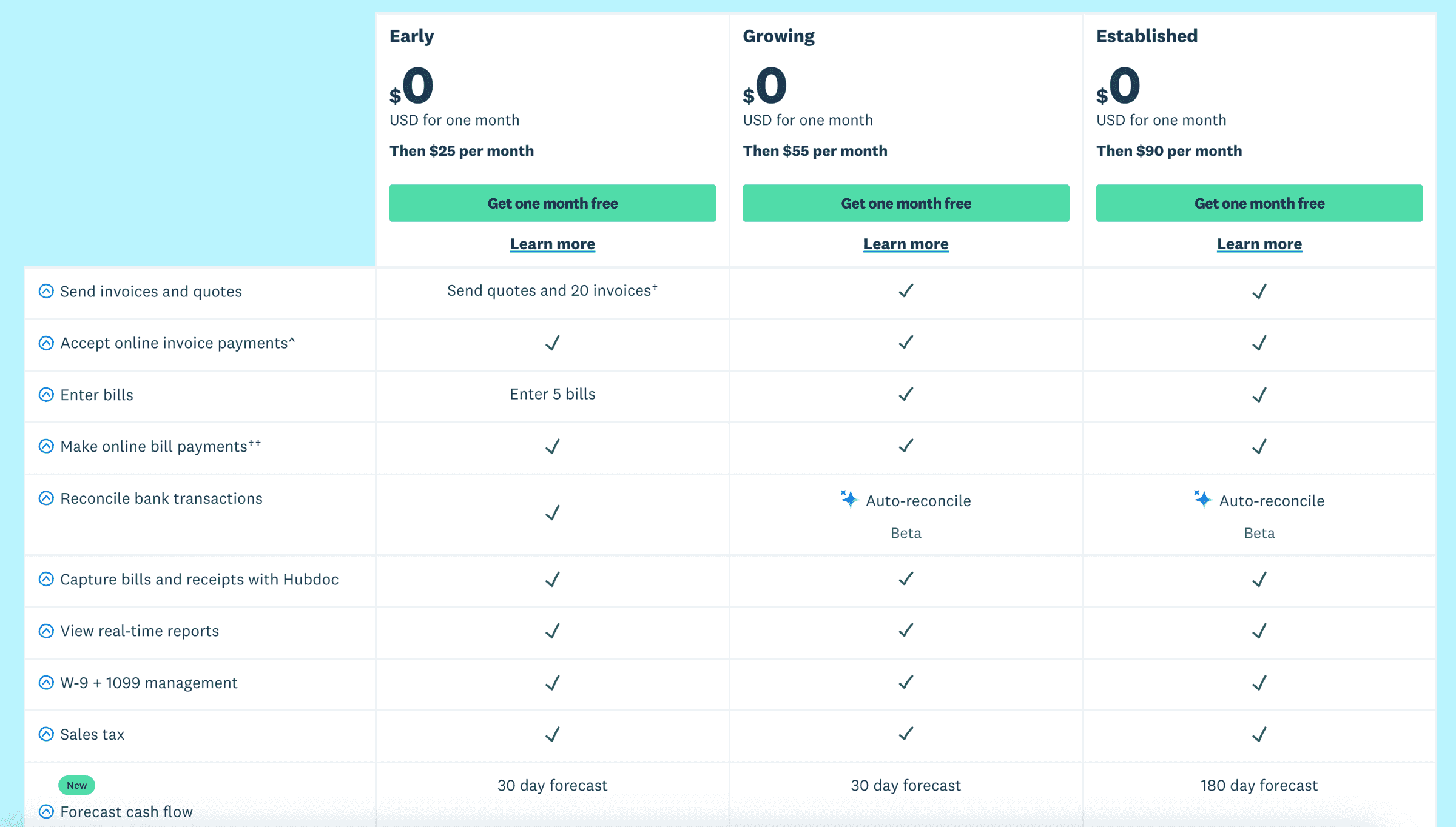
Xero plans start at $25, $55, and $90. There are additional fees for payroll but no fees for additional users.
Freshbooks
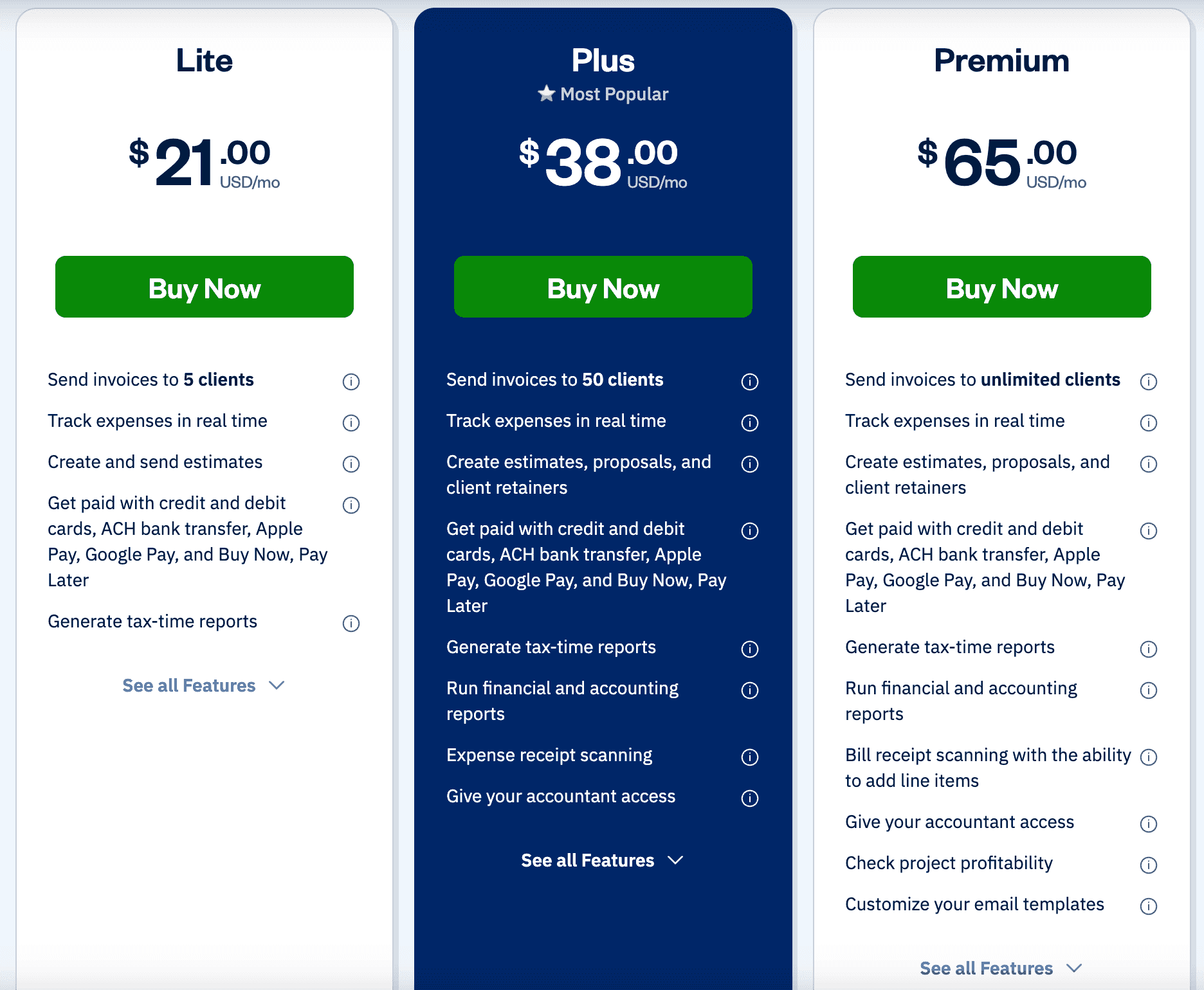
Freshbooks plans start at $21, $38 and $65.
Wave
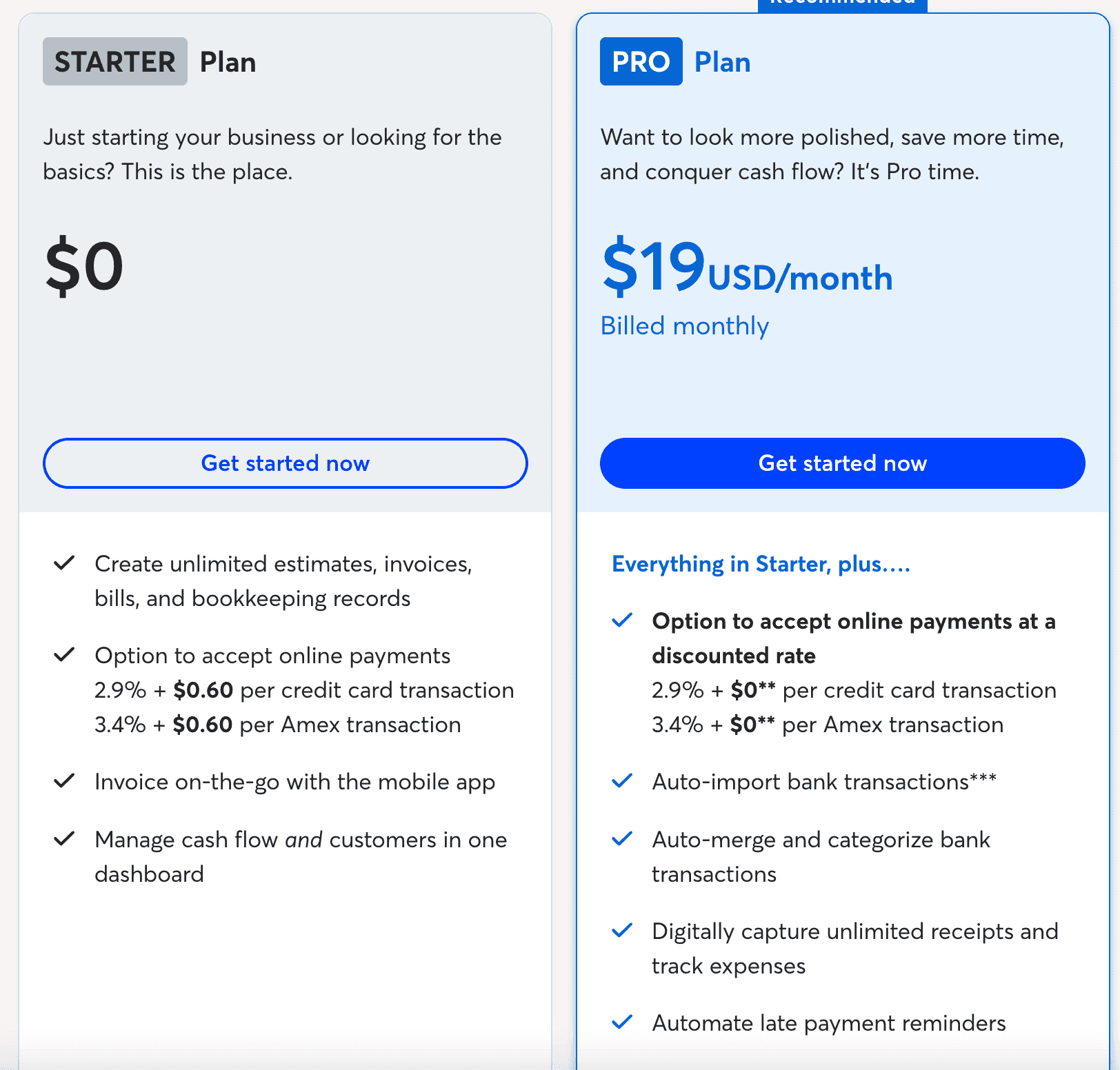
Wave plans start at $0 and $19 per month.
Spreadsheets
Pricing is where spreadsheets really shine.
While my spreadsheets have an initial fee - once you own the templates - you can use them forever!
Plus, you can use them for both business and personal finances (unlike accounting software).
My unique spreadsheet templates are on GoogleSheets, which is free within space constraints. If you use it primarily for our spreadsheets then you should be fine with the free space.
While initially I intended to create excel versions, we have stuck exclusively with GoogleSheets because...
- We have never lost any data, ever!
- It's a virtually hosted spreadsheet so there's no confusion with different versions
- There's no issues with different versions of software
- It has fabulous features for collaborating with others, and we use it to communicate with participants in our Master Your Accounting & Taxes program
- It's safe and secure
Learn more about why I've become 100% GoogleSheets, here.
Summary of Pricing Comparison:
QuickBooks:
Monthly: $38, $115, $275
Wave:
Monthly: $19
Xero:
Monthly: $25, $55, $99
Spreadsheets with Support & Training:
Lifetime: $1,497
FreshBooks
Monthly: $21, $38, $65
Software Integrations
- As your business grows, you may use additional softwares for your industry, operations, your website or CRMs and literally everything syncs with Quickbooks and Xero.
- Freshbooks has an API which is a way that you can sync with many things but with a few extra steps to setup. It’s a custom integration tool.
- Wave has some specific software/apps they sync with and I noticed a big one is Etsy.
Invoicing
They all do invoicing so I'm not going to go into details.
To be clear though, you should not be using an accounting software for invoicing.
There are cheaper and better tools for stand-alone invoicing. However, you should use your integrated invoicing tool if you are paying for accounting software.
Spreadsheets is the exception here as they do not have automated invoicing.
You can use a spreadsheet template for occasional invoicing. Generally I recommend getting a free or low-cost app that specializes in invoicing only.
Tip: check your specific type of phone's apps by searching 'invoice' and 'invoicing' + your industry.
Support
First, support can’t trump the software functionality.
Although quickbooks has phone support, this doesn't make some of the challenges easier.
Xero doesn’t have phone support initially. Instead, you reach out through email or chat and then they'll call you or schedule a call, if needed. My experience was that their support is more efficient.
- In Freshbooks, the highest tiered plan includes phone support.
- In Wave, the paid plan has chat and email support.
- With my spreadsheets and training, you can add on support with me in live office hours where you can ask questions and learn from others, or we have add on 1-on-1 support with Advisors that are bookkeeping and tax professionals that are certified in my system.
Users
All of the softwares allow different numbers of users per plan, but every plan under Xero has unlimited users.
As you grow their could be a lot of reasons you might add users and this can be a convenient feature.
When it comes to my spreadsheets, GoogleSheets allows you to have unlimited users but theres a maximum of 100 users that can be in the spreadsheet concurrently.
Collaborating With Others
For collaboration, GoogleSheets spreadsheets take the win!
All accounting software is really designed for a bookkeeper to do on the business owners' behalf. The problem with this is that it doesn't make it easy for you (business owner or bookkeeper) to collaborate with others (business owner, bookkeeper, partner, assistant, tax pro, etc.).
Spreadsheets
Collaborating with others isn't easy in any spreadsheets, but it is in Google Sheets spreadsheets!
This is the main reason we’ve stuck with Google Sheets because it makes it so easy to collaborate with people.
Whether you are delegating certain tasks, working with an assistant or a partner, or your tax pro; it is really easy to collaborate.
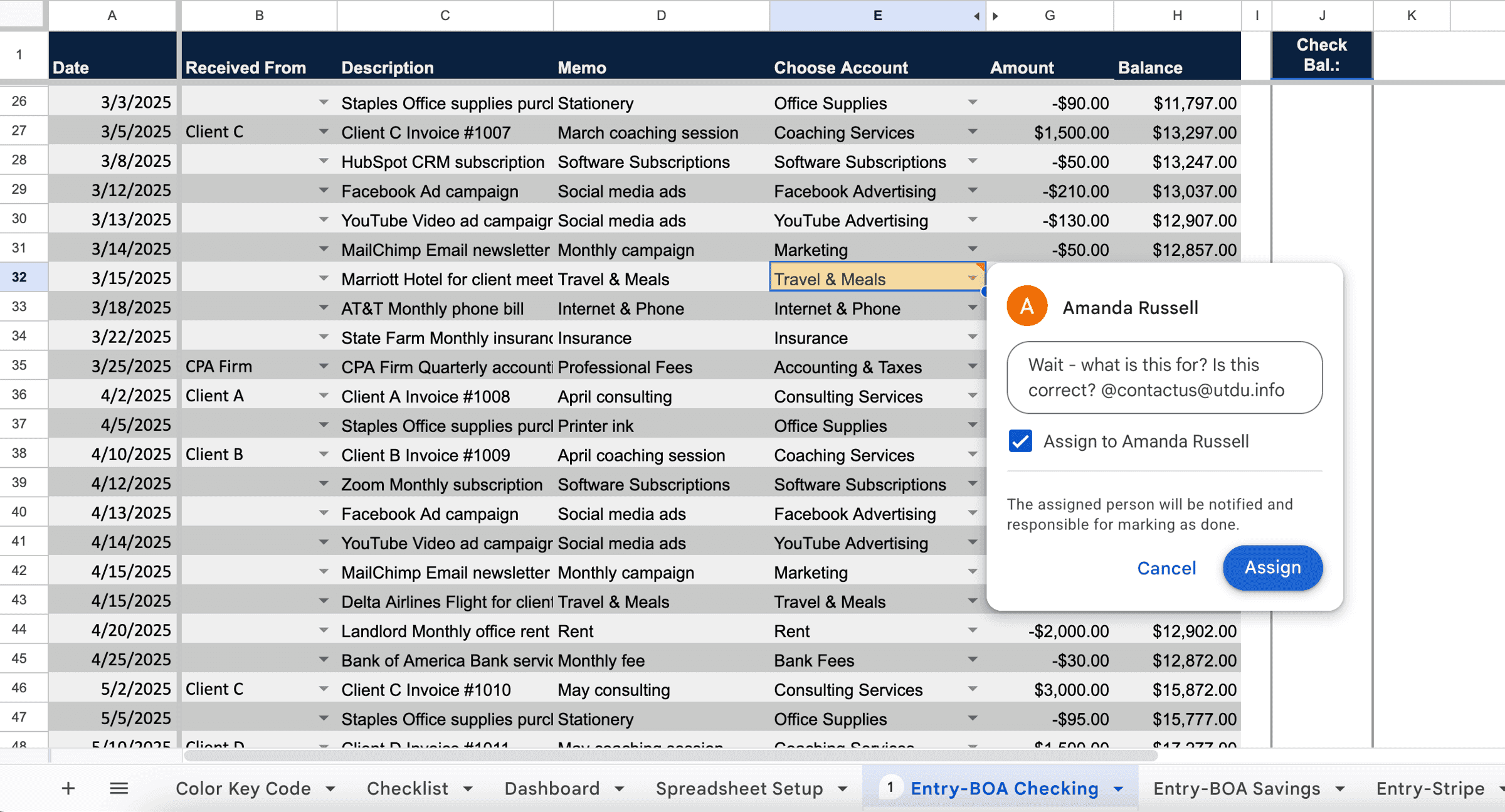
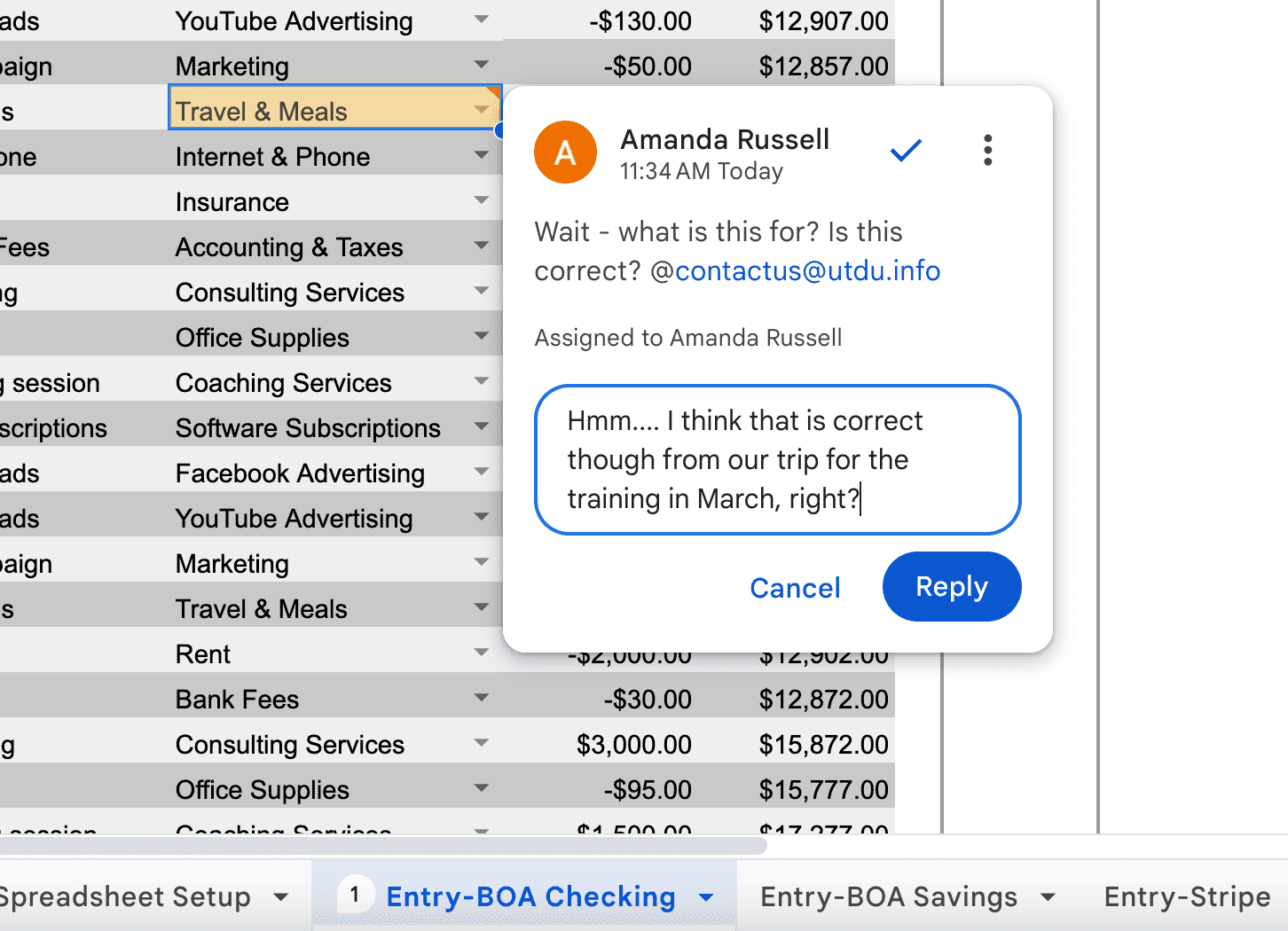
The comment feature, which allows you to ask a question inside the accounting records. Because you are able to comment inside the records, you don't need to provide context because the person can see the context and reply directly to your question. Plus, you are notified of communications in email.
For example, if an assistant imports your transactions and selects the account for you, but isn’t sure what a transaction was for, they can comment on it and ask you.
Xero
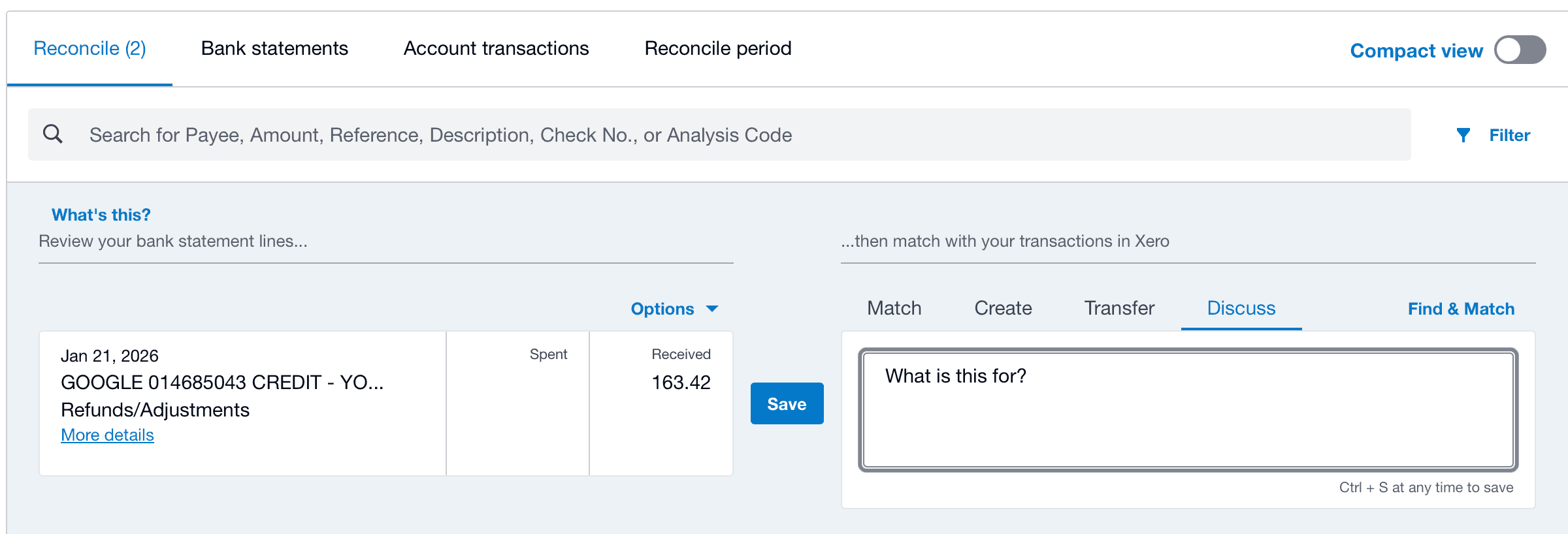
Next up is Xero with their "discuss" tab feature. Each transaction is reconciled in each of your bank and credit card accounts. The left column is the imported transaction and the right column is where you record it in Xero. The "discuss" tab is where you can comment to another user a question.
When it comes to collaborating, it can be challenging to find collaborating support. This is why our programs stand out!
- Master Your Accounting & Taxes includes 1-on-1 support with an Advisor who supports and teaches you how to do everything yourself. While delegation can be great, often business owners need to learn and get set up right so that they can delegate (or prefer to DIY).
- In my Advisor program, I teach professionals how to work with business owners using a Done-With-You (DWY) model, whether you use spreadsheets or software.
Receipt capture
It’s an attractive feature! Being able to take a picture of your receipt and have that automatically sync up inside your accounting software.
Unfortunately, my experience is that the functionality is not quite as magically as it sounds. On the plus side, I expect this feature to continue to improve.
Xero
Xero has multiple ways to do this. All in all, they are a little clunky, but reliable.
In the Xero app, you can take a picture of the receipt and set up the accounting transaction but you have to manually enter the details. They have the functionality for employee expense reimbursement and with a HubDoc integration.
Freshbooks & Wave
Both Wave and FreshBooks claim in their highest tier plans that they have this functionality. I have not yet tested it, but according to other peoples experience, it looks like they have some cool features in this are
Quickbooks
Quickbooks has this feature, but I’ve heard it’s very quirky and also misreads the receipts.
Now, in my spreadsheets, I just recommend that you save your receipts and invoices in a paper and/or virtual file folder (like google drive). Then you copy and paste in your transactions. As long as you are a smaller business and you are familiar with all of your transactions, this is all you need to do.
Reports
All of these options have reports!
Reports summarize the transactions you recorded in the software. Generally, the reporting is limited to how you set up the accounts and software.
The top two main business accounting reports are:
- Income Statement
- Balance Sheet
Like we've covered, I prefer Freshbooks and Wave as income and expense trackers because they are not as flexible with transactions effecting our "Balance Sheet" report.
Xero definitely excels at reporting. They have unique reporting customizations and presentation. Plus, they have a new analytics feature that also does budgeting and cash flow, which tends to be a lot more difficult than you think it should be!
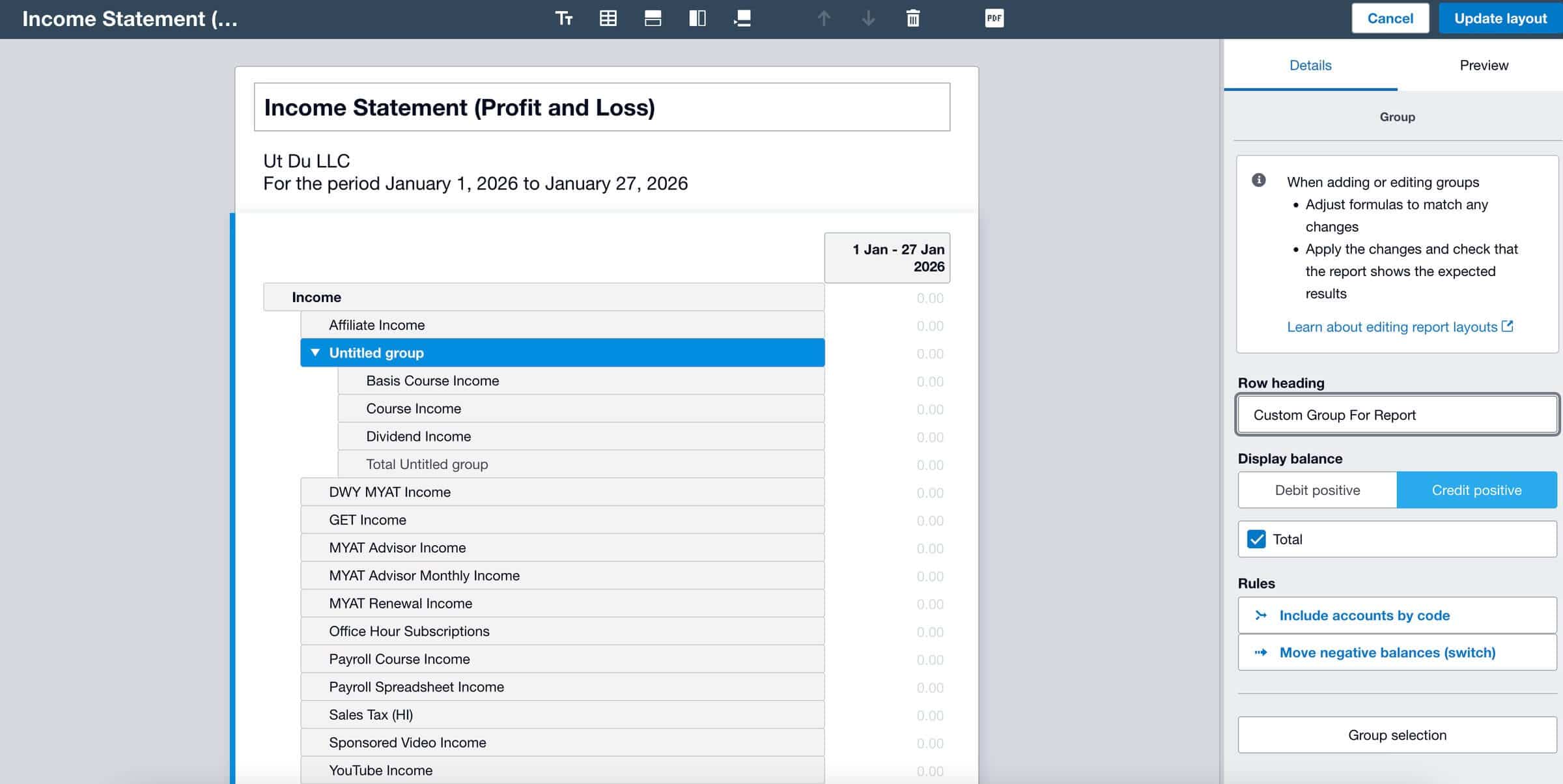
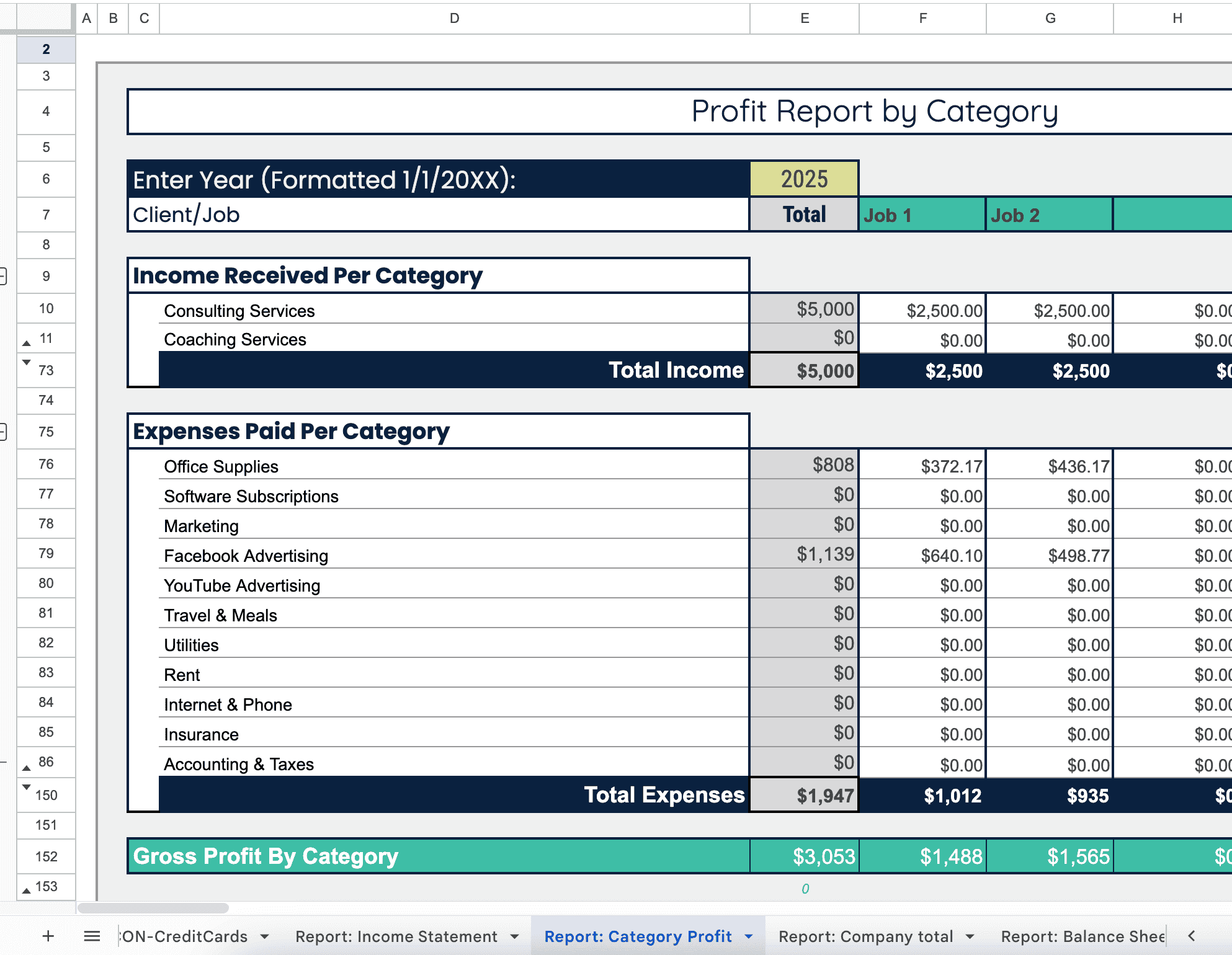
Although limited by setup, our spreadsheets can be easily duplicated and tweaked for creating customizations. Plus, our spreadsheets are especially great at Job Costing.
This is where you need to assign certain parts of your income and expenses to individual jobs. For businesses that have jobs with lots of expenses, having this information can be critical to success.
Final Recommendations:
If you are a Sole proprietors - then income and expense trackers are fine (because that's all they need to track, but if you can track more if you want).
- My free worksheet is a perfect FREE option (download it here)
- Spreadsheets, FreshBooks, and Wave are good options
- If you use Etsy, Wave has a direct integration
If you have an LLCs, Corporations & Partnerships - then you need a complete accounting system that tracks income, expenses, assets, liabilities and owners' equity.
- My unique spreadsheets from the Master Your Accounting & Taxes Program (learn more here)
- For software, Xero is the best (test it out at 90% off here)
- Generally, I do not recommend Quickbooks or Sage (most expensive and clunky)
- FreshBooks or wave can be good cheaper options for simple situations (but it only takes a few transactions to create a headache!)